
To set up Sky email on your Android device, follow the below mentioned steps:
STEP 1:
Go to the “Email” app of your device. Click on the “Email” tab and select “New”.
Related FAQ - How To Update Sky HD Box Software?
STEP 2:
Click on “Add Account”.
STEP 3:
Now you have to enter your Sky Yahoo mail address and password. To continue click on “Next”.
Related FAQ - How To Program Your Sky Remote With Your Sky Box Or Sky TV?
STEP 4:
Select your account type to “POP or IMAP”.
Related FAQ - How To Troubleshoot Your Sky Hub Microfilters?
STEP 5:
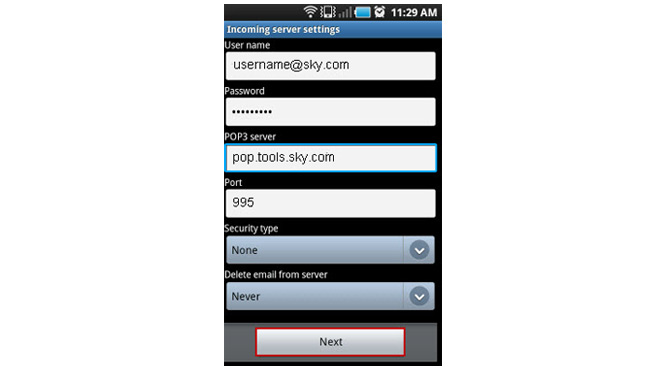
Enter the “Income Server settings” mentioned below and click on “Next”:
Username: Enter your Sky Yahoo email address.
Password: Enter your Sky Yahoo email password.
POP3 server: If you are using POP3, enter “pop.tools.sky.com” with PORT number : 995
IMAP server: if you are using IMAP, enter “imap.tools.sky.com” with PORT number: 993.
Security Type: Security type should be set to “SSL (Accept all certificates)”
Related FAQ - What to do when there is no sound while watching Sky go?
How To Access Sky Hd Box Secret Installer Menu Setup?
STEP 6:
Enter the “outgoing Server settings” mentioned below and click on “Next”.
-
“smtp.tools.sky.com” with Port number: 465
-
Set “Security type” to: “SSL (Accept all certificates)”.
Related FAQ - What to Do When You Are Not Able To Connect To Sky on Xbox 360?
Sky Multiscreen – Its Benefits & Cost?
STEP 7:
You can personalise the account name in “Your Name” field and click on “Done”.
CHECK SKY EMAIL POP AND IMAP SETTINGS:
STEP 1:
Go to the “Email” app of your Android device.
STEP 2:
If you have setup multiple accounts on your device, then click on “Sky Yahoo mail” account and click on “Options” > “settings”. If you have set up the Sky account on your device, click on “Options” > “settings”.
STEP 3:
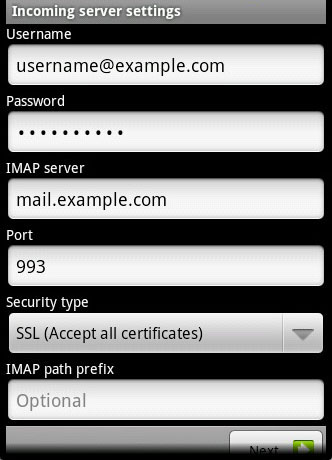
Scroll down to “Incoming Settings/Incoming Server Settings”.
Related FAQ - How to deal with Sky go buffering problems?
STEP 4:
Check the following details in the “incoming Settings” field:
-
If the details entered in “POP3” is “pop.tools.sky.com” or “imap.tools.sky.com”, then you do not have to change any settings.
-
If the details are “imap.gmail.com”, or “pop.gmail.com”, then you will have to set up an email account using the Sky settings instead.
Related FAQs - Cannot Access Sky Yahoo Mail – Sky Email Issues -
How To Fix Invalid Configuration Sky Go Error Message? -
How To Fix Not Enough Disk Space Sky Go Error Message?
Sky Cancellation Number To Cancel Your Sky Subscription
Call the Sky contact number For more assistance,Your call will be transferred to Sky technical support department.



One comment: On How To Setup Sky Email Account On My Android Device?
Hi, i feel which i saw you visited my weblog so i came to return the favor?.I’m trying to to find issues to enhance my website!I assume its ok to
utilize some of your concepts!!